Create Marketing Segments Based on Aveda Plus Rewards Membership
If your business is integrated with the Aveda Plus Rewards program, you can create target segments based on whether a guest is a valid Aveda Plus Member. This allows you to run targeted campaigns exclusively for verified Aveda loyalty members or to identify guests who are not yet linked.
Overview
Zenoti's segment rules builder includes an Aveda Plus Rewards category that lets you filter guests based on their Aveda Plus Rewards membership status. The rule evaluates two conditions from the existing Aveda integration data:
The guest profile is linked to Aveda, AND
The guest's Aveda membership ID is valid.
A guest must satisfy both conditions to be considered a valid Aveda Plus Member for segmentation purposes.
Prerequisites
The Aveda Plus Rewards integration must be active at both the organization and center levels. Refer to the Aveda Plus Rewards Integrated with Zenoti article.
Guests must be enrolled in or linked to the Aveda Plus Rewards program. Refer to the Link an Existing Aveda Plus Rewards Membership to a Zenoti Guest or Set Up Aveda Plus Rewards for New Members article.
Create a segment using the Aveda Plus Rewards rule
For detailed guidance on creating custom segments and working with the rules builder, refer to the Create a target segment article.
At the organization or center level, navigate to Marketing > Target segments.
Click Create new.
Click Create custom segment.
Enter a segment name and description.
Example name: Active Aveda Plus Rewards Members
Example description: Guests with a valid Aveda Plus Rewards membership
Click Add rule manually. The Edit segment panel opens on the right.
In the Advanced settings dropdown, select the appropriate guest filter (for example, All guests who have visited a targeted center (any visit)).
Under New rule, in the What do you want to filter by? field, click the Select category dropdown.
Select Aveda Plus Rewards from the category list.
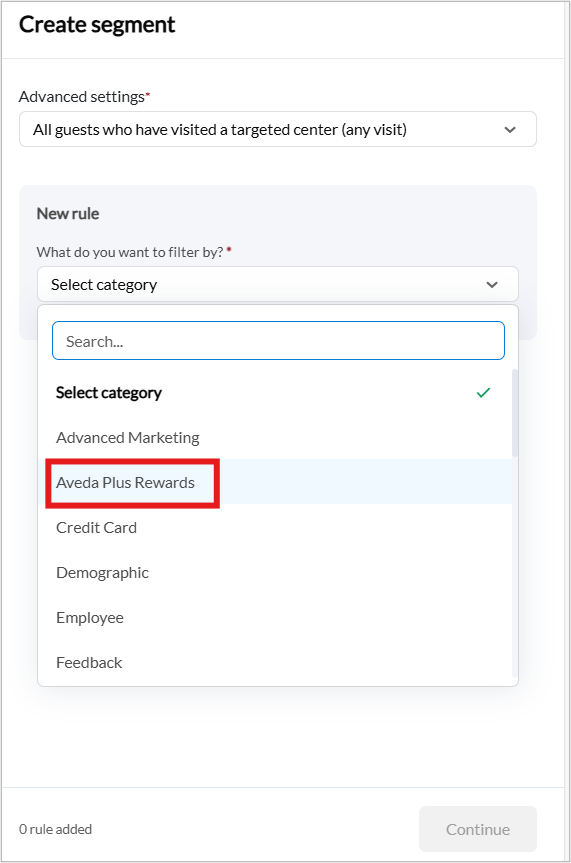
Configure the rule fields according to your requirements.
Click Save rule.
(Optional) To further refine the segment, click Add rule again and combine with other conditions such as Visits or Spend.
Note
Zenoti only supports AND logic when combining multiple rules. All rules must be satisfied for a guest to be included in the segment.
Click Continue.
Example use cases
Scenario | Rules configuration |
|---|---|
Send an exclusive Aveda product promotion to verified loyalty members | Aveda Plus Rewards > Aveda Plus Member > Yes |
Identify guests who visit frequently but are not enrolled in Aveda Plus Rewards | Aveda Plus Rewards > Aveda Plus Member > No, combined with Visits > Visits by Time > more than > 3 visits in 6 months |
Target high-spending Aveda members for a VIP event invite | Aveda Plus Rewards > Aveda Plus Member > Yes, combined with Spend > Total Spend > more than > $500 |
Note
The Aveda Plus Rewards rule works in combination with all other segment rules (demographics, visits, spend, memberships, and more).
The segment preview guest count reflects the Aveda rule accurately. If counts appear lower than expected, verify that guest profiles are properly linked to Aveda and that the Aveda Membership ID field is populated.
This rule evaluates the current Aveda membership status at the time of segment generation. If a guest's Aveda membership becomes dormant or is unlinked after the segment is created, they will no longer match the rule on the next segment refresh.