Cancel your Zenoti (myZen) Card
You can cancel your Zenoti (MyZen) card from the Zenoti app. The process differs slightly depending on whether you are managing a physical or virtual card. This article explains how to cancel your card, the reasons for cancellation, and any applicable fees.
Overview
Physical cards are used for in-person transactions, while virtual cards are mainly for online payments. If you cancel your physical card, your virtual card—if available—remains active unless you choose to cancel it separately.
Steps to cancel your card
Open the myZen app and go to My Money.
Identify your card type:
Swipe right or left to switch between your physical and virtual cards.
Select the card you want to cancel:
For physical cards, tap the card and choose Cancel Card.
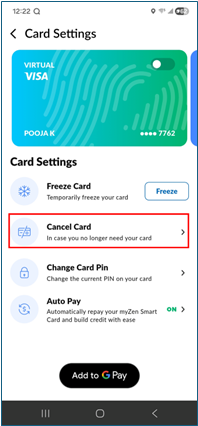
For virtual cards, note that they may still remain active for online transactions.
Provide a Reason for Cancellation and add any relevant comments.
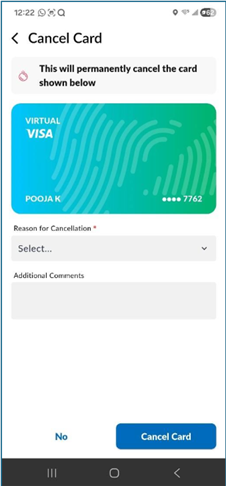
Verify your identity using the code sent to your registered email or phone number.
Tap Cancel Card to confirm the cancellation to permanently block the card.
Request a replacement card, if needed.
Note
It typically takes 7–10 business days to receive a new card after cancellation.
Troubleshooting when cancellation doesn’t work
If you can’t find the option to cancel or face an error:
Make sure you’ve selected the correct card. The app may show your virtual card first by default.
Swipe the screen to view physical card options.
Check the card’s delivery status. Cards marked as Not Delivered may display a Request Replacement option instead of cancellation.
If the issue persists, contact MyZen Customer Support for help.
Handling fraud or unauthorized charges
If you notice fraudulent or unauthorized activity:
Cancel your card immediately in the app.
Select Fraud as the reason for cancellation.
Request a replacement card.
Confirm that you selected the correct card type (physical or virtual).
Note
For fraud-related cancellations, the $5 replacement fee is waived, and your new card should arrive within 7–10 business days.
Reasons for cancellation and fee applicability
Reason selected | Description / When to select | Fee applicability |
|---|---|---|
Not Delivered | Select if your card never arrived. | No charge |
Fraud | Select if your card is compromised due to unauthorized or fraudulent use. | No charge |
Lost | Select if you can’t locate your card. | $5 replacement fee (if not first physical card) |
Damaged | Select if your card is physically damaged and unusable. | $5 replacement fee (if not first physical card) |
Other | Any other reason not listed above. | $5 replacement fee (if not first physical card) |
Key terms
Term | Description |
|---|---|
Card Cancellation | The process of permanently blocking your Zenoti (MyZen) Card from further use. |
Cancellation Reason | The specific reason selected when canceling a card — such as Not Delivered, Fraud, Lost, Damaged, or Other - which determines whether a replacement fee applies. |
Replacement Fee | A $5 charge (configurable) applied for issuing a new physical card, except when the cancellation reason is Not Delivered or Fraud. |
Priority Shipping | A $10 fee (configurable) if you choose faster delivery when requesting a replacement card after cancellation. |
Fraud | A cancellation reason used when your card is compromised or used for unauthorized transactions; no replacement fee applies in such cases. |