Additional FAQs for Running Payroll
Q: If an employee joins in the middle of a pay period and is on a salaried compensation, will the Salary amount be apportioned automatically?
A: No. Zenoti defaults to the full salary amount even in the first pay period, although the employee has not worked the entire period. If the business is using ZIP or any other payroll provider, they must manually update the Salary details for the first pay period.
Q. Why is Salary Not Showing in the Payroll Run?
A: This happens when the Salary column or Salary earning type is not enabled in Zenoti. To fix this, complete the two steps below in order.
Step 1: Check if the Salary column is visible in the Payroll Summary report
Open the Payroll Summary Report.
Check whether the Salary column appears.
If yes, go to Step 2.
If no, follow these steps to enable it:
Go to List of Reports (V2) → Payroll → Payroll Summary Report → Customize.
Select Salary.
Click Save.
Step 2: Enable the Salary earning type
Go to ZIP Dashboard → Settings → Review Setup.
Open the Earning Types tab.
Click Add/Manage Earning Types.
Select Salary.
Click Save.
After completing both steps, rerun payroll. The employee’s salary will now be included.
Q. Is negative net pay allowed?
A. No. Negative net pay is not allowed. An employee’s overall net pay must always be a positive amount. Payroll cannot be processed if deductions or negative earnings result in a negative net pay.
If deductions are higher than earnings in a given pay period, consider deducting the amount across multiple payrolls. For non-taxable deductions, the business can ask the employee to return the amount using external payment methods such as Zelle or Venmo.
Q. Is check issuance supported for employees with Manual payment?
A. No. Check issuance is not supported for employees marked with Manual payment. ZIP does not issue physical checks for these employees.
The business is responsible for issuing the check or paying the employee using external payment methods such as Zelle or Venmo.
Q. Why is an employee not visible in the payroll input screen?
A. To include an employee in the payroll input screen.
Go to ZIP Dashboard > Employees.
If more than one business exists, select the required business using the top-right filter.
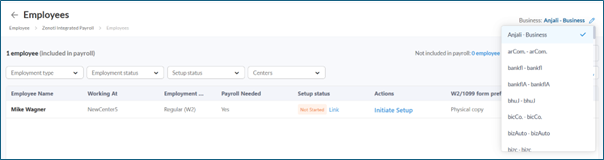
Click Not included in payroll and select the required employee to include them in the payroll input screen.
Note
Employees with a salary compensation structure appear only in their base center and do not appear in payroll input screens for other centers.
Q. How do I remove an employee from payroll for a specific location without affecting their ability to float between salons?
A. Use the appropriate payroll configuration based on how the employee should be paid:
If the employee should be paid only from their base center: Enable Do not consider invoices from other centers to pay employees from their base center.
If two centers belong to the same business: Payroll cannot be enabled for one center and disabled for another. Customers cannot set Payroll Needed = Yes for one center and No for another center within the same business.
If the employee should not be included in ZIP payroll at all: Set Payroll Needed = No.
To update this setting:
Go to ZIP Dashboard > Employees.
Find the required employee record.
Update the Payroll Needed column as required.
Note
Payroll inclusion is controlled at the employee level, not at the center or role level.
Q. What is included in Payroll Cost?
A. Payroll Cost = (Gross earnings − Tips + Reimbursements) + Company taxes + Company benefits.
This means payroll cost includes:
Gross earnings, excluding tips
Reimbursements
Employer-paid (company) taxes
Employer-paid (company) benefits
Q. Where can I change the unemployment tax rate (or similar tax rates)?
A. To update the unemployment tax rate or other state tax rates:
Go to ZIP Dashboard > Settings > Tax Set Up.
Select the relevant state tax parameters and make the required changes.
Q. What are Manual payments in the payroll receipt?
A. Manual payments include:
Employees whose payment method is set to Manual.
Benefits for which the business pays the premium manually to the provider outside this payroll.
Tips paid through Zenoti Wallet (amounts already paid manually or digitally outside this payroll).
To understand or reconcile these amounts, review the Payroll Register to match the numbers and clarify details as needed.
Q. Why can’t I find a required earning in payroll?
A. If a required earning is visible in the Payroll Summary Report but not available for selection, verify that the earning is enabled in Earning Types.
To resolve this:
Go to ZIP Dashboard > Settings > Review Set Up > Earning Types.
Click Manage earning types.
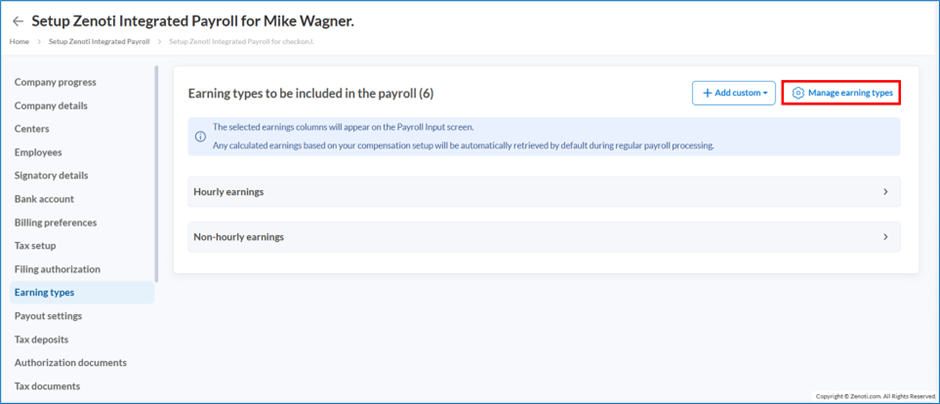
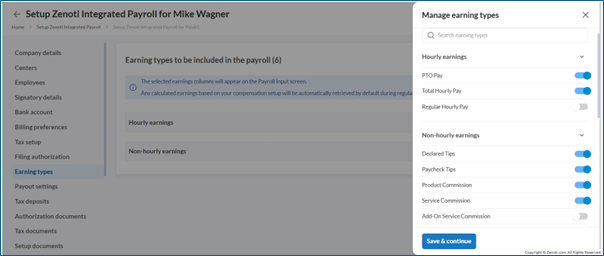
In the side panel, enable or disable the required earnings using the toggle.
Note
Only earnings enabled in Earning Types are available for payroll processing.