Zenoti payments (Stripe Express) buy now, pay later (BNPL) FAQs
This article answers frequently asked questions about using Buy Now, Pay Later (BNPL) payment methods with Zenoti Payments through Stripe Express.
This FAQ provides clarity on how BNPL works when integrated with Zenoti Payments via Stripe Express. It explains the supported BNPL providers, how transactions are processed, what guests can expect during checkout, and how businesses can manage settlements, refunds, disputes, and reporting. The information helps centers understand how BNPL behaves within their Stripe Express payment flow.
Q: What are the processing fees for these transactions?
A: A flat 5.9% for each BNPL transaction, which also includes the processing fee.
Q: Which companies are part of this program?
A: Zenoti Payments (via Stripe Express) is integrated with Affirm, Afterpay, and Klarna in the US and Canada, and with Clearpay and Klarna in the UK, Australia, and New Zealand.
Q: How do I create an account with these BNPL companies?
A: The integration is handled through your Zenoti payments (via Stripe Express), so no additional setup is required.
Q: Can I connect my existing Affirm/Afterpay/Klarna account to Zenoti payments (via Stripe Express)?
A: No, this integration is separate from standard Affirm, Afterpay, or Klarna accounts.
Q: How do I receive payouts?
A: Payouts will be made through your Zenoti payments (via Stripe Express) account. The payout schedule will follow your existing Zenoti payments schedule.
Q: Is it free for the guest?
A: Guests have three repayment options, one of which is fee-free.
Q: Can you set a minimum value for when BNPL is offered?
A: Yes, you can set both a minimum and maximum value for each BNPL transaction.
Q: How does this work in-store?
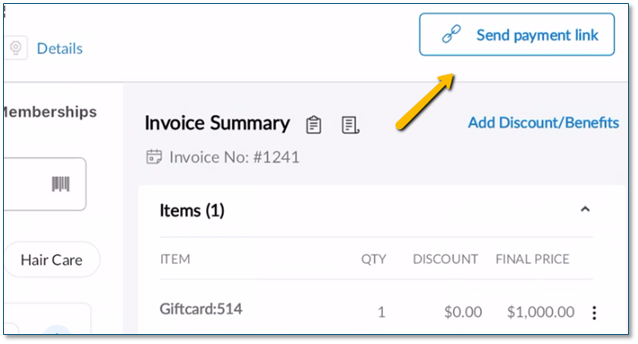
A: In-store, on the webPOS, a payment link is sent to the guest for BNPL payment of the invoice.
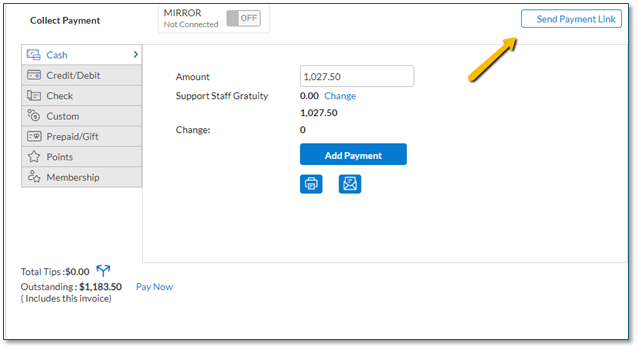
This can also be done via our MobilePOS.
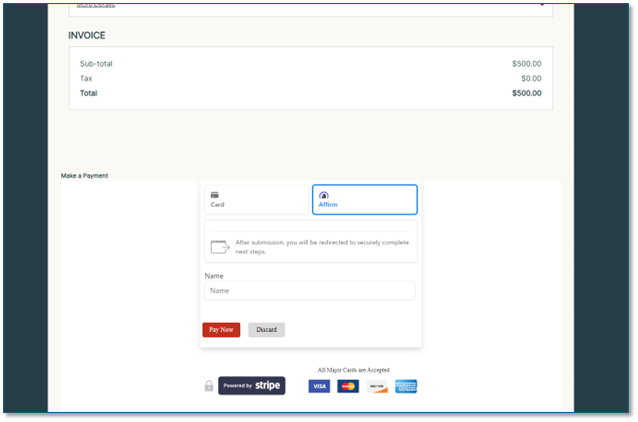
Q: How does this work on the Webstore?
A: Online, the BNPL option is provided at checkout if the transaction meets the set minimum value.
Q: Is the application process quick?
A: Yes, the average application time is less than 10 minutes.
Q: How long will it take for the transaction to appear within Zenoti?
A: The transaction will appear in Zenoti in under one minute after approval.
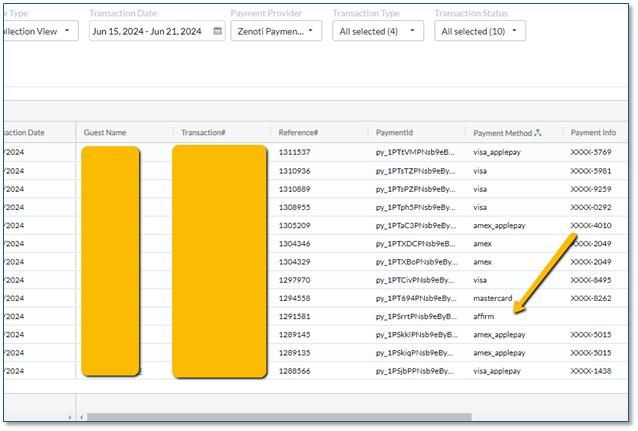
Q: What type of reporting is available?
A: All BNPL transactions will be reported in the digital payments reports and are also available on your Stripe Express dashboard.
Term | Description |
|---|---|
BNPL (Buy Now, Pay Later) | A payment option that allows guests to split their purchase into installments instead of paying the full amount upfront. |
Stripe Express | The payment processor used by Zenoti for enabling BNPL methods such as Affirm, Klarna, and Afterpay. |
Affirm | A BNPL provider supported through Stripe Express that allows guests to pay over time. |
Klarna | A BNPL provider supported through Stripe Express that offers installment-based payments. |
Afterpay | A BNPL provider supported through Stripe Express offering pay-in-installments for eligible purchases. |