Understanding KYC/KYB status and center payment processing capabilities
This article explains how KYC status, the KYC Timeline, and center-level readiness are displayed in Zenoti Payments during Adyen onboarding.
Overview
During onboarding, your business must complete the required KYC (Know Your Customer) or KYB (Know Your Business) checks. These checks confirm your business identity, decision maker information, payout bank account details, and compliance acknowledgments. The KYC status appears in the main grid and reflects the overall progress of these checks.
There are two major aspects related to payments processing readiness for your business:
1. The KYC/KYB status of the merchant/business account.
2. Individual center’s readiness to process payment and receive payouts.
You can view your business’s KYC status and verification details from the Payment processor onboarding page.
Here’s how you can navigate to that page:
Go to Configuration > Payments > Process payments.
Select Payment processor onboarding.
Select the payment processor.
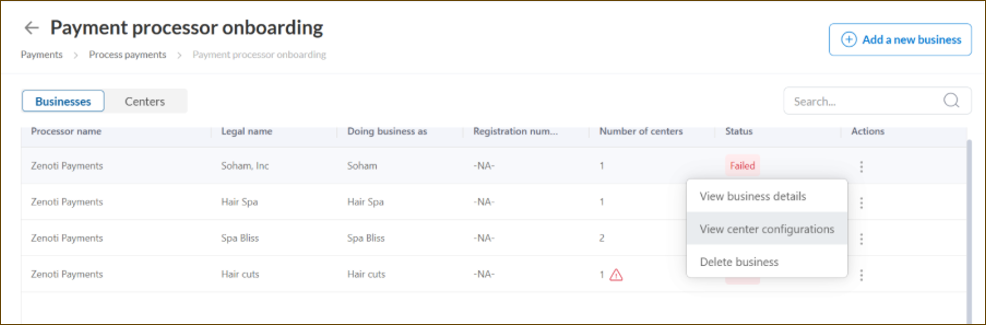
The status column in the grid shows the KYC/KYB status of the merchant account.
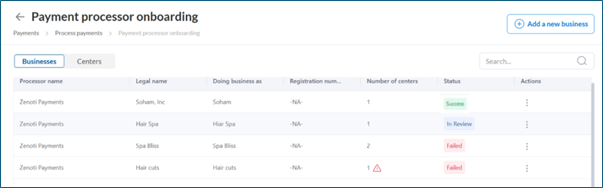
Similarly, you can view the center’s readiness status in same grid through the warning symbol – no warning symbol indicates the centers are ready to process payment and get regular payouts.
View KYC/KYB details
Here’s how you can navigate to the details:
Go to Configuration > Payments > Process payments.
Select Payment processor onboarding.
Select the payment processor.
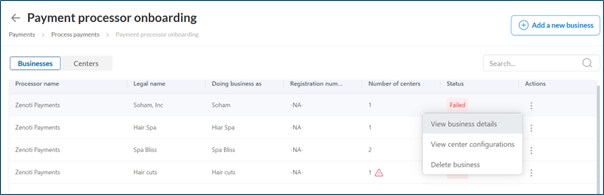
In the Actions column, select the three-dot menu and choose View business details. You need to authenticate via an OTP to the email address associated with the business to view the details.
KYC/KYB status values
The Status column on the Payment processor onboarding page shows the overall KYC progress for each business, helping you identify which businesses require attention.
Status | Meaning |
|---|---|
Incomplete | One or more required fields have not been submitted. |
Pending Verification | Information is submitted to the payment processor but verification is still in progress. |
Success | All required checks have been successfully verified for the merchant account. |
Failed | One or more checks failed and require correction. |
Action Required | Additional updates or resubmissions are needed to complete verification. This status may appear if previously verified information has been updated and must be reviewed again. At times, there might be new checks introduced by the payment processor for which the status might change from Success to Action Required. |
KYC summary
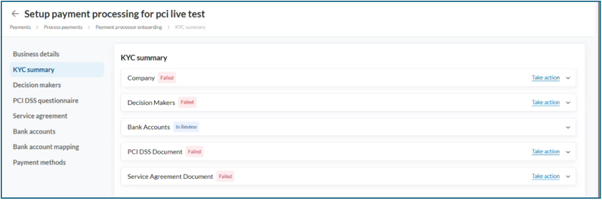
From the left navigation, select KYC Summary - The KYC Summary page provides a consolidated view of the verification status and deadline (if applicable) for company, Decision makers, Bank accounts and other compliance needs.
You can expand each different section in the view to understand the error in details. You can directly navigate to the section with error and take corrective action by clicking on “Take action".
Verification status by type
Verification type | Status | What it means / What to do |
|---|---|---|
Company Verification | Incomplete | One or more required fields are missing. Navigate to “Business details” section and fill the details. |
Pending Verification | Details submitted; review may take 2–4 business days. No immediate action needed. | |
Success | Company information verified successfully. | |
Failed | Verification failed. Navigate to “Business details” section to take corrective actions. | |
Decision Maker Verification (Each decision maker is shown with identifying details to help distinguish between multiple individuals during verification.) | Incomplete | One or more decision makers have missing details. Navigate to “Decision makers” section and fill the missing details. |
Pending Verification | Identity of the individuals are under review. No immediate action required. | |
Success | All decision makers have been successfully verified. | |
Failed | Verification failed due to mismatched information or poor-quality documents. Navigate to “Decision makers” section and take corrective actions. | |
Bank Account Verification | Incomplete | Mandatory bank details are missing. Navigate to “Bank accounts” section and fill the details required. |
Pending Verification | Bank account details are under review. No immediate action required. | |
Success | All bank accounts are verified successfully. | |
Failed | Verification failed due to invalid or unclear documentation or other mismatches. Navigate to “Bank accounts” section and take correctice actions. | |
PCI DSS Signage | Incomplete | PCI documentation acknowledgment is pending. Navigate to “PCI DSS questionnaire” section and take action. |
Success | PCI documentation signed successfully. | |
Service Agreement Signage | Incomplete | Service agreement acknowledgment is pending. Navigate to “Service agreement” section and take action. |
Success | Service agreement signed successfully. |
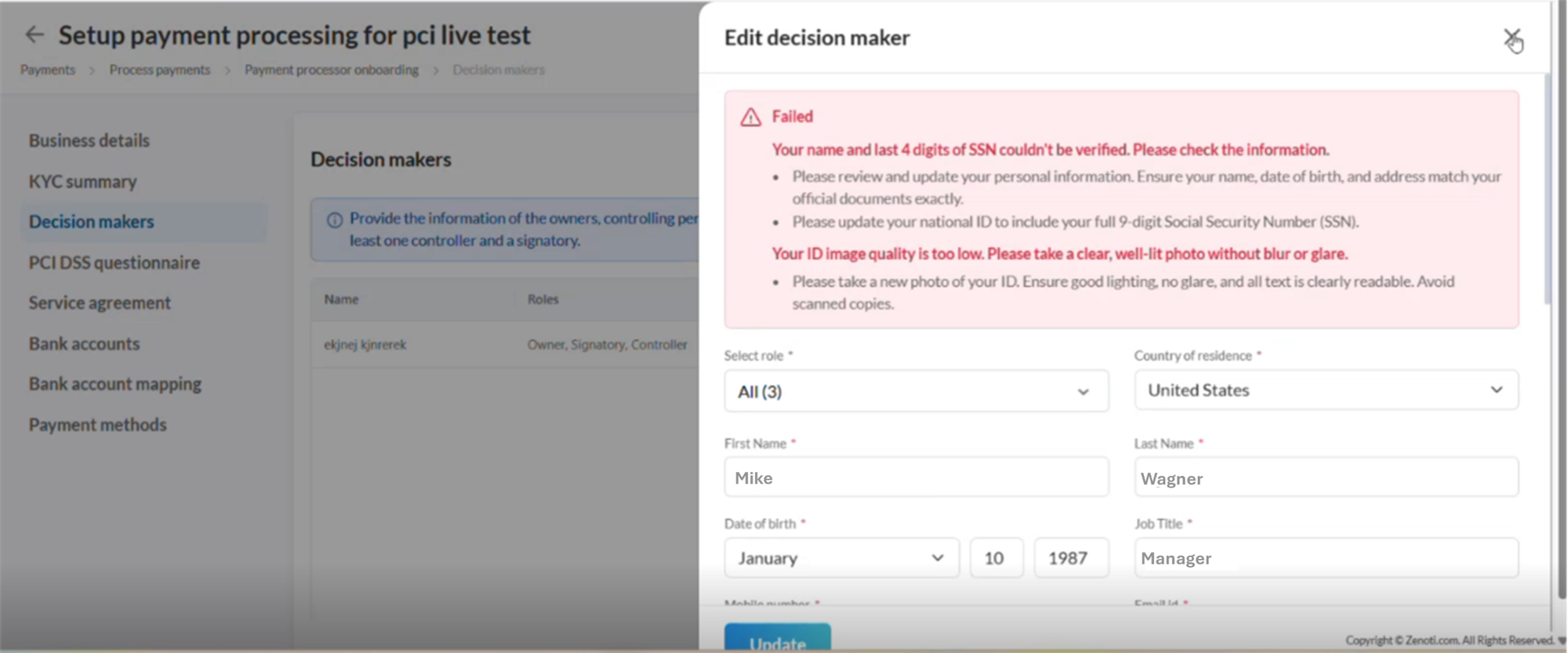
Below screen shows how you can see details of the errors pertaining to a decision maker:
The Centers Linked column (in the main grid) displays the number of centers associated with the business.
A warning icon appears if any center is not ready for payment processing or payouts.
Hovering over the icon shows the issue count (for example: “2 center(s) are not ready to either take payments or receive payouts”).
Select View center configurations from the three-dots in action menu to view all centers and their capabilities.
Center-level capabilities
This section shows whether each center is ready to accept payments and receive payouts.
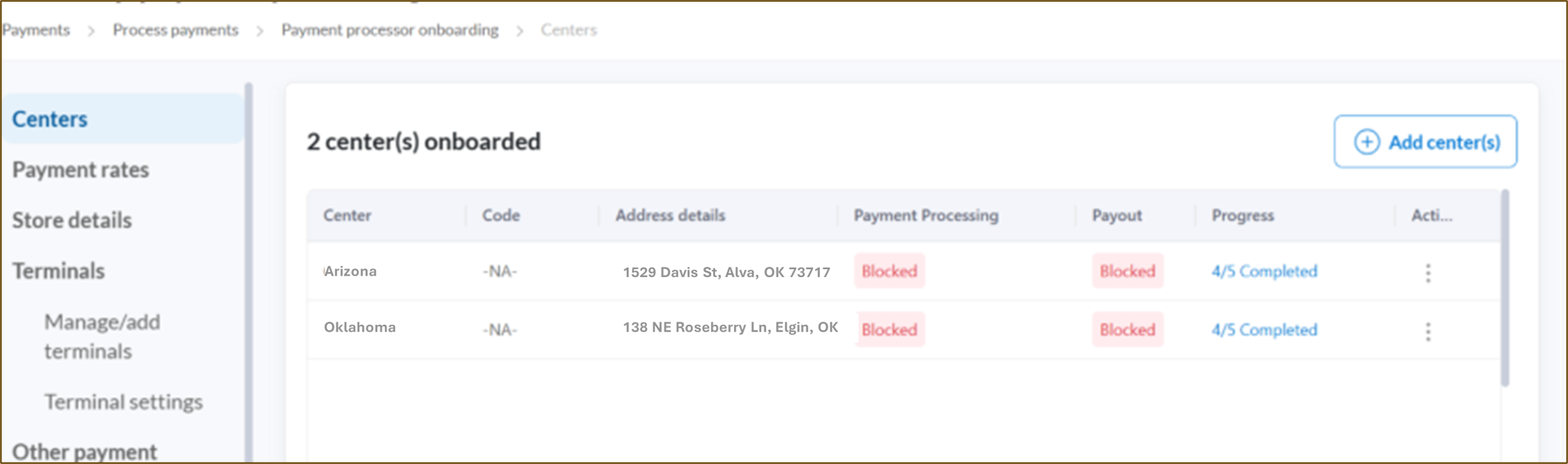
Capability | Status | What it means / What to do |
Payment Processing | Allowed | Centers are correctly configured to accept payments. |
Blocked | Payment processing capability is blocked for the center. Ensure the KYC of your business is successfully verified. Additionally, navigate to “Store details” tab for any potential error. Contact support if the problem persists. | |
Payout | Allowed | Centers are eligible to receive payouts. |
Blocked | Payouts cannot be processed. Ensure the KYC of your business is successfully verified. Contact support if the problem persists. |
Term | Description |
KYC Status | The current verification stage of your business during onboarding (Incomplete, Pending Verification, Success, Failed, Action Required). |
KYC Timeline | A detailed view of verification checks, status messages, and corrective actions. |
Verification Type | Specific checksrequiredfor merchant onboarding, such as company verification, decision maker verification, bank verification, PCI DSS signage, and service agreement signage. |
Center-Level Status | The readiness of each linked center to process payments and receive payouts. |
Capability Status | Indicates whether a center is allowed, blocked, or in progress for payment processing and payouts. |
Decision Maker Verification | The identity validationrequiredfor individuals who manage or own the business. |
PCI DSS Signage | Confirmation that the business has acknowledged PCI DSS compliance documentation. |
Action Required | Indicates that additional updates or resubmissions are needed to complete verification. |