View invoice history for product billing
This article explains how to view and manage invoice history for product billing in Zenoti.
Overview
You can use the Billing page to see invoices generated within the product for supported add-ons, apply filters to narrow results, and export invoice details when needed.
Access the Billing page
To access the Billing page
Go to Configuration.
Select Payments > Process Payments > Billing.
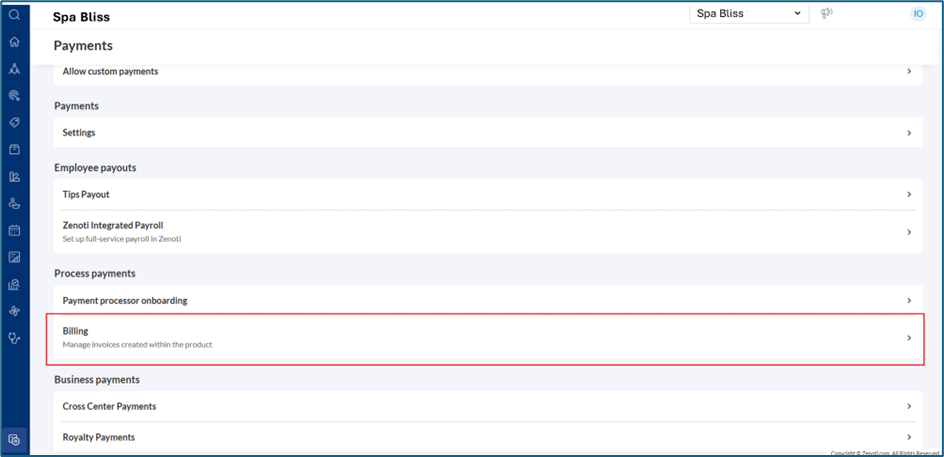
View product billing invoices
The Billing page displays invoices generated within the product for all add-ons considered for billing.
Currently, invoices are available for the following add-ons:
ZIP
IC+
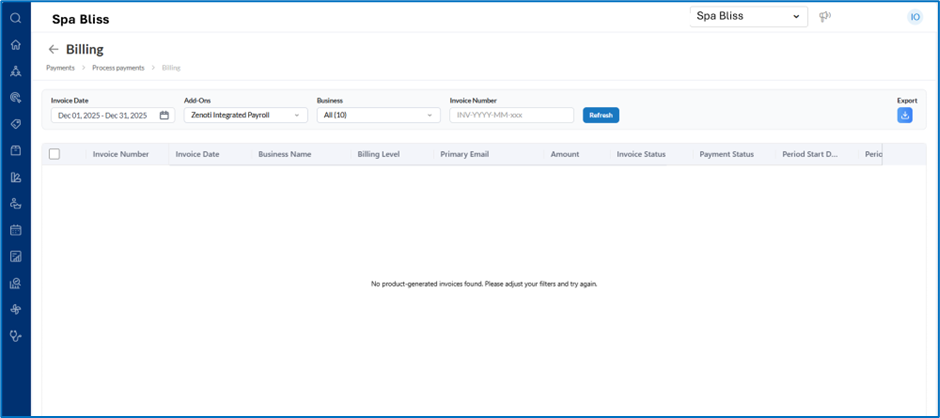
Filter invoices
Use the available filters to refine the invoice list:
Invoice number
Invoice date
Add-ons: ZIP and IC+ billing
Business or center context
Export invoices
Select Export to download invoice details based on the applied filters.
Term | Description |
Billing | Area in Configuration where product-generated invoices are displayed |
Invoice number | Unique identifier used to search for a specific invoice |
Invoice date | Date range used to filter invoices |
Add-ons | Product add-ons currently supported for billing: ZIP and IC+ |
Business / Center | Context used to filter invoices by business or center |
Export | Option to download the invoice list |