Configure opportunity sources
Opportunity source is the channel or method through which a potential customer discovers and engages with your business. It helps you track where your opportunities come from so you can measure marketing effectiveness, optimize campaigns, and allocate resources wisely.
By assigning a opportunity source to each new inquiry or customer, your business can identify which channels drive the most conversions and revenue.
For example, your opportunity sources may include Client referrals, Instagram, Facebook, TikTok, Google Ads, Email and SMS campaigns, and Marketing phone calls.
Opportunity sources matter because they provide clear visibility into where customers are coming from, enabling businesses to track ROI (Return on Investment), allocate marketing spend more effectively, and gain deeper insights into customer behavior. By knowing which channels perform best, businesses can focus on the most impactful campaigns while also streamlining the sales process to nurture opportunities more efficiently based on their origin.
At the organizational level, navigate to Opportunity (Lead) Management > AI Lead Manager > Settings > Opportunity Sources.
The page displays all your opportunitysources.
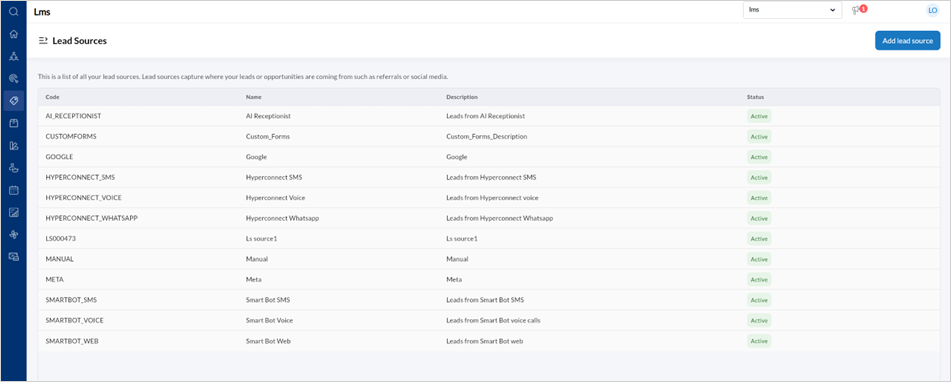
To add a new opportunity source, click Add opportunity source.
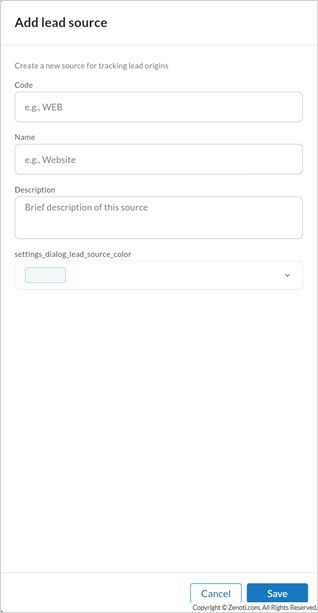
Enter the Code, Name of the lead source, a Description of the sources, and Color.
Click Save.
To edit a opportunity source,
Hover over the specific opportunity source listing and click the edit icon.
Edit the Code, Name, Description, or Color.
Set the opportunity source as active or inactive by using the toggle.
Click Save.