Configure opportunity stages
Opportunity stages represent the various steps in your sales journey – starting from the very first contact with a potential customer or lead to either converting them into a paying customer or losing the lead or opportunity. By tracking opportunity stages, your business can monitor progress, ensure timely follow-ups, and measure conversion performance at each stage of the funnel. For example, you may create opportunity stages such as New lead, Contacted, Qualified, Closed - Won, Closed - Lost.
Opportunity stages provide visibility into the health of your sales pipeline, hold teams accountable for follow-ups and deadlines, highlight where leads drop off to improve conversion, and support accurate revenue forecasting by tracking progression through each stage.
At the organizational level, navigate to AI Opportunity (Lead) Management > AI Lead Manager > Settings > Opportunity Stages.
The page displays all your opportunity stages.
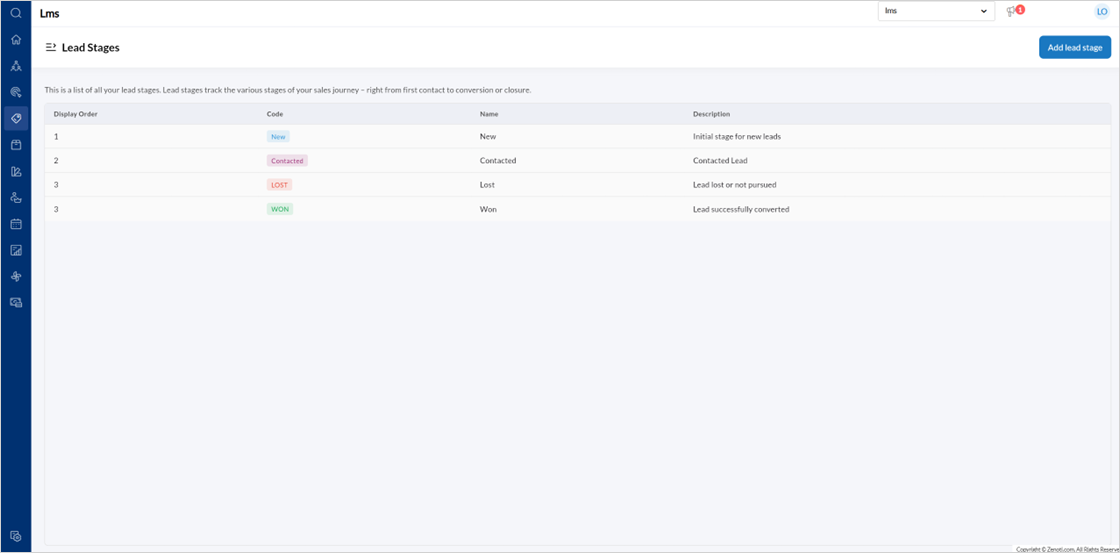
To create a new opportunity stage, click Add Opportunity Stage.
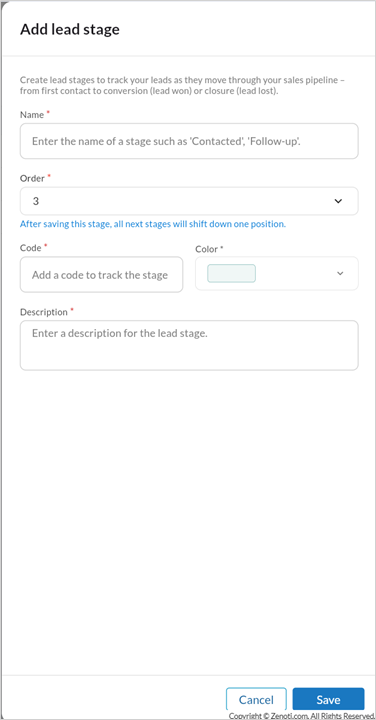
Enter the stage Name, Order, Code, Color, and Description.
Click Save.
Note
Changing the order automatically adjusts other stages.
To edit a Lead stage,
Hover over the specific Lead stage listing and click the edit icon.
Edit the Name, Order, Code, Color, and Description.
Click Save.