Leave Management in Zenoti
This article explains how employees can use Leave Management in Zenoti to view leave balances, submit leave requests, and track leave request status.
Overview
Leave Management is available only for businesses that use Zenoti Integrated Payroll (ZIP) in the United States with a Premier Tier subscription. Employees can access this feature through the myZen app and the Zenoti web portal. It is enabled by the Zenoti product team upon request.
Note
Leave Management is not available if ZIP is not enabled, even for US-based businesses.
Watch videos:
Access Leave Management
Employees can access Leave Management through:
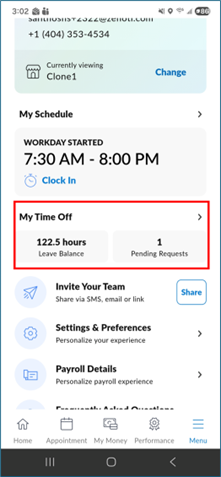
myZen app: Navigate to Profile > My Time Off.
Zenoti web portal: Log in and click your Profile > Time Off.
Note
Leave Management is not available in the ZMA app.
The Time Off option is visible only if you are mapped to a leave policy.
View your leave balance
You can view your leave balance in the MyZen app or the Zenoti web portal.
The balance shows:
Leave type (only leave types mapped to you under your leave policy are visible)
Available leave balance (current balance in hours)
Hours availed in the current active period (since the last accrual reset)
For example, if the policy grants 1 hour of leave for every 30 hours worked, the balance accrues based on the hours you work.
Details show additional information about the leave balance.
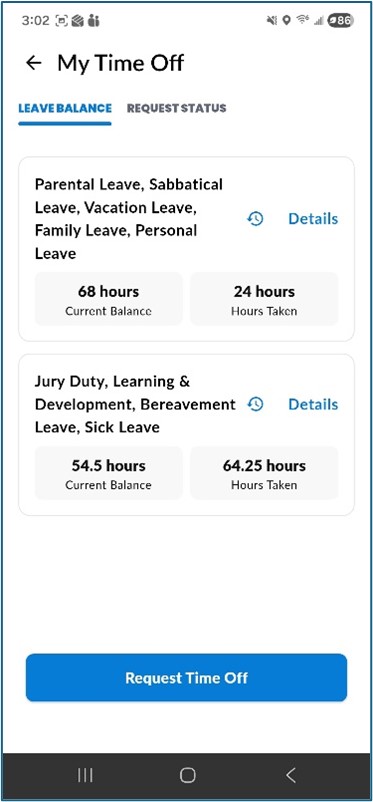
Click Details to view additional information about the leave balance breakdown.
Click the clock icon to view the audit history of your leave balance. You can download this history by clicking the download icon.
Submit a leave request from the web portal
Follow these steps to submit a leave request from the Zenoti web portal:
Log in to the Zenoti web portal.
Click your Profile.
Click Time Off.
Navigate to the My Request Status section.
Click Request Time Off.
Select the leave type from the dropdown.
(Optional) Enter any notes.
Select the start and end dates.
Review the request. Adjust the hours using the Start Time and End Time dropdowns if needed.
Click Submit Request.
Note
The leave type dropdown shows only the leave types mapped to you under your assigned leave policy.
After submission, the leave request appears in the My Request Status section. The status updates based on manager action.
When a leave is approved, your leave balance updates automatically, and a block is placed on the appointment book for the approved period.
Submit a leave request from the myZen app
Follow these steps to submit a leave request from the myZen app:
Login to the myZen app.
Navigate to Profile > My Time Off.
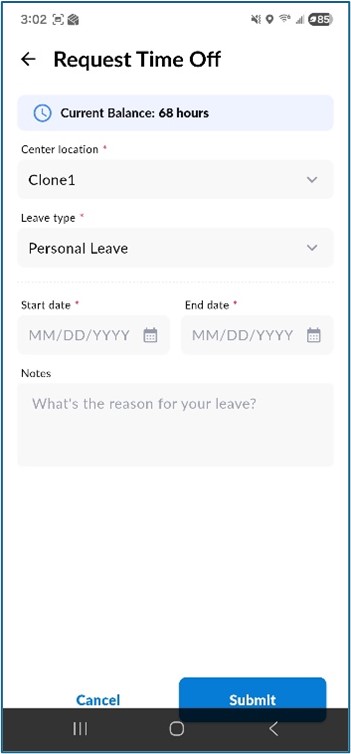
Click Request Time Off.
The center where you are mapped is displayed. Select the Leave Type from the dropdown.
Select the date range for the leave.
Enter notes.
Review the start and end time for each day. Modify the time as required for partial-day leaves.
If multiple dates are selected, use the checkbox to copy the hours to all selected dates.
Click Submit.
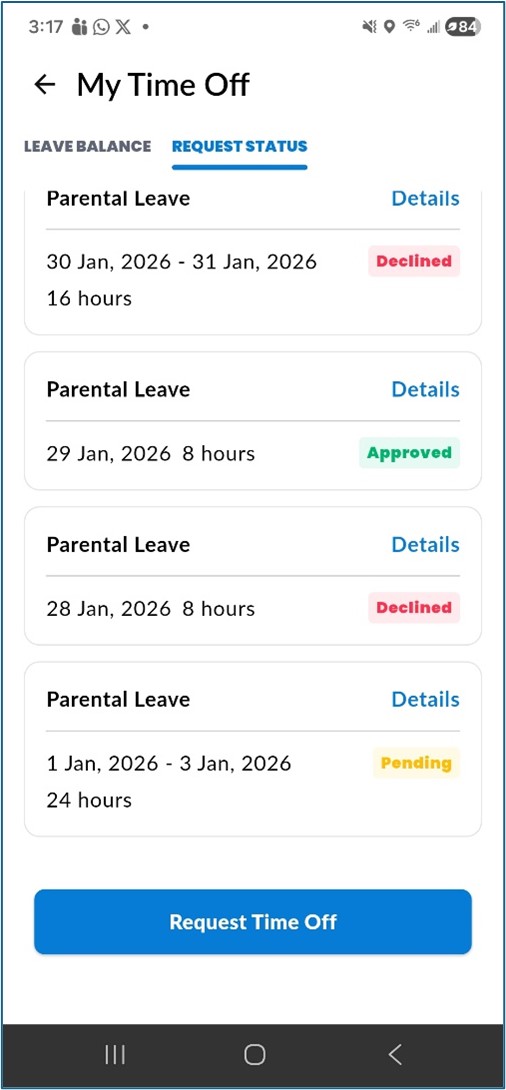
After submission, the leave request appears in the Request Status tab with a status of Pending, Approved, or Denied.
Cancel a leave request
You can cancel a leave request from the myZen app or the Zenoti web portal, including leave requests that are already approved.
Navigate to Profile > Time Off > My Request Status.
Locate the leave request.
Click the three-dot menu next to the request.
Click Cancel Leave Request.
Navigate to Profile > My Time Off > Request Status.
Click Details for the leave request.
Click Cancel Request and confirm.
When a leave request is cancelled:
The leave is added back to your leave balance.
If the leave was approved, the appointment book block is removed.
Note
You can cancel upcoming leave requests.
Cancellation is not available for past leave requests.
Frequently asked questions (FAQs)
Q. Why do I not see Leave Management in my app?
A. Leave Management is available only if your business uses Zenoti Integrated Payroll and is located in the United States.
Q. Can I submit a leave request from the web portal?
A. Yes. Navigate to your Profile > Time Off > Request a Time Off to submit a request from the web portal.
Q. Can I access Leave Management from the CMA app?
A. No.
Q. Why does my leave balance show decimals?
A. Leave balances accrue based on the number of hours worked, which can result in decimal values.
Q. What happens when I cancel a leave request?
A. The cancelled leave is added back to your leave balance.
Q. Can I take a partial-day leave?
A. Yes. When submitting a leave request, adjust the Start Time and End Time to request leave for specific hours within a day.
Term | Description |
Leave Management | Feature used to view leave balances and submit leave requests |
Leave Balance | Available leave time |
Accrual | Leave earned based on hours worked |
Pending | Leave request awaiting action |
Approved | Leave request approved |
Denied | Leave request denied |
Partial-day leave | A leave request for specific hours within a day rather than a full day |
Audit history | A record of all changes to your leave balance, including accruals and manual adjustments |