Accept Contactless Payments with Tap on ZMA
Simplify payment collection with Tap and Pay — no payment terminal required!
This article explains how service providers can collect contactless payments directly on their Android (NFC setting supported) & iPhones using Tap and Pay feature on ZMA.
Note
This feature is not supported on Tablet and iPad.
Overview
The Tap on ZMA feature allows service providers to accept contactless card and mobile wallet payments directly on their phone, eliminating the need for physical payment terminals.
Guests can complete payments simply by tapping their card, phone, or smartwatch on the provider’s NFC-enabled device. Transactions are processed instantly, helping you:
Speed up checkout times
Reduce hardware dependency
Lower costs related to payment terminals
Tap and Pay is currently available as a Beta feature and disabled by default.
Key benefits
Accept contactless payments directly from your mobile phone.
Faster and seamless checkout experience for guests.
Reduced hardware costs - no payment terminal required.
Secure processing through Zenoti Payments (Adyen).
Supported configuration
Category | Supported | Not supported |
|---|---|---|
Payment Processor | Adyen (Zenoti Payments) | Stripe or other processors |
Regions | United States, United Kingdom, Canada, Australia, Denmark, Spain, Netherlands | All other countries |
Platform | NFC-enabled Android and iOS devices | Android in Canada |
Payment Methods | Apple Pay, Google Pay, Samsung Pay, AMEX, Visa, Mastercard, Maestro, Discover, Diners, VPay | Interac Debit, JCB, UnionPay, EFTPOS |
Payment Options | Contactless NFC (Card, Mobile Wallet, Smartwatch) | Cash, Check, Gift Cards, Memberships, Loyalty, Custom, Donations, Cashback, Surcharge, Scheduled Collections |
Tap to Pay add-on fee
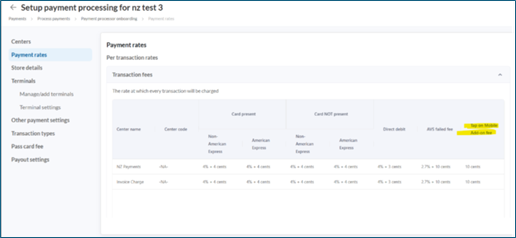
Every Tap and Pay transaction includes a small add-on fee, in addition to the standard card processing fee.
This fee is non-editable and automatically applied based on the country.
Country | Tap on mobile add-on fee |
|---|---|
United States | $0.09 |
Canada | $0.11 |
United Kingdom | £0.08 |
European Union | €0.09 |
Australia | $0.12 |
New Zealand | ¢0.09 |
Example fee calculation
For a $100 transaction in the United States:
Standard card processing: 2% + $0.30 = $2.30
Tap on Mobile add-on: +$0.09
Total fee: $2.39
Deposit to business account: $97.61
How to enable Tap and Pay
Follow these steps to enable Tap and Pay:
Go to Payment Processor Settings at the Center level in Zenoti.
Navigate to Other Payment Settings tab.
Enable Tap to Pay feature.
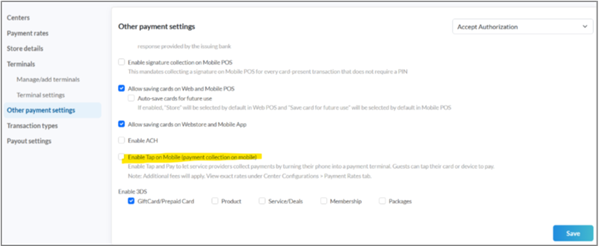
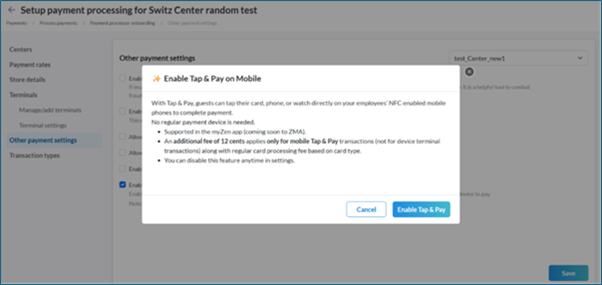
Once enabled, the Tap on ZMA Add-on fee becomes visible in the Payment Rates screen for reference.
Collect payments (for employees)
Once enabled, service providers can collect payments directly from the ZMA mobile app.
Role permission
Employees should have either “Add or Edit” role for under Appointment book section or allow access to appointment book on Desktop or ZMA.
Open the appointment on ZMA.
Select NFC Mobile from the Terminal drop down (visible only on NFC-enabled phones).
The app opens a guest-facing invoice screen showing services, pricing, and tip options.
Note
Supports only ZMA Tips and not Terminal tips.
Guest can initiate Payment by tapping:
Physical card (contactless/NFC)
Mobile wallets (ApplePay, GooglePay)
Smartwatches (where supported)
Based on card settings, if pin is required, it will be prompted on ZMA UI
Once payment succeeds:
A confirmation message appears.
Receipt is emailed to the guest (using the center’s email credits).
Provider can close or keep the invoice open for further additions.
Reporting
A new column “Terminal Name” has been added to the Digital Payments Report.
For Tap and Pay transactions, the Terminal Name will appear as NFC – Mobile.
The card processing fee includes the add-on fee as well for transactions processed through Tap on Mobile.
Frequently asked questions (FAQs)
Q: Is Tap and Pay available for all businesses?
A. Currently in Beta and available only for businesses using Zenoti Payments (Adyen) in the US, UK, Canada, and Australia.
Q: Are Tap and Pay fees editable?
A. No. The add-on fee is fixed per country and automatically applied.
Q: Can guests save their card for future payments?
A. Yes, if the center’s settings allow card saving for memberships or recurring payments.
Key terms
Term | Description |
|---|---|
Tap and Pay | Contactless payment with tap on mobile feature in ZMA that lets providers collect payments directly on their phones. |
NFC (Near Field Communication) | Wireless technology that enables contactless transactions. |
Zenoti Payments (Adyen) | Payment processor that supports Tap and Pay transactions. |
Digital Payments Report | Report that tracks Tap and Pay transactions and applicable fees. |
Tap and Pay fee | Additional per-transaction fee shown in Payment Processor Settings → Payment Rates. |
Terminal Name | Field in the Digital Payments Report. Tap and Pay transactions appear as NFC – Mobile. |
Note
Tap and Pay is also available on ZMA. See Accept Contactless Payments with Tap on Mobile Feature in myZen for more information.