How to access paystubs from myZen app
This article talks about how you can access your paystubs from your myZen app.
Overview
The myZen app allows you to view and download your paystubs directly from your mobile device. You can access pay-period wise information and download detailed paystub information anytime, including after leaving the organization.
Steps to access paystub
Follow these steps to access paystubs on myZen app:
Open the myZen App.
Launch the myZen app on your mobile device and log in with your credentials.
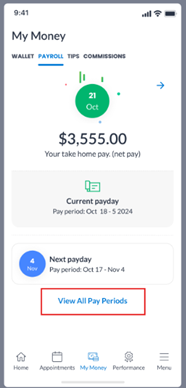
Go to My Money.
Tap on My Money from the bottom navigation menu on the home screen.
Select the Payroll tab.
Within My Money, tap on the Payroll tab to access your payroll information.
View All Pay Periods.
Tap on **View All Pay-Periods** to see a complete list of your pay periods.
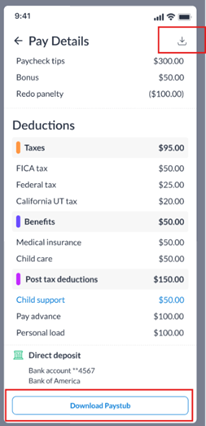
Open a pay period.
Tap on the required pay period to view the retailed paystub information for that period.
Download your paystub.
On the detailed paystub screen, tap the Download icon to save a copy of your paystub to your device as needed.
For terminated or inactive employees
If you are a terminated employee, you can still access your paystub information by logging into the myZen app using your registered mobile number or email ID.