Shopify Integration at Center Level
You can configure the Zenoti–Shopify integration at the center level to connect a specific Shopify store to a specific center. This setup is ideal for franchise or multi-center businesses where each center operates its own Shopify store. When configured at the center level, all Shopify data syncs only to the mapped center.
How to configure Shopify at the center level
Navigate to the required center.
Go to Integrations.
Select Integration Settings.
Expand Ecommerce.
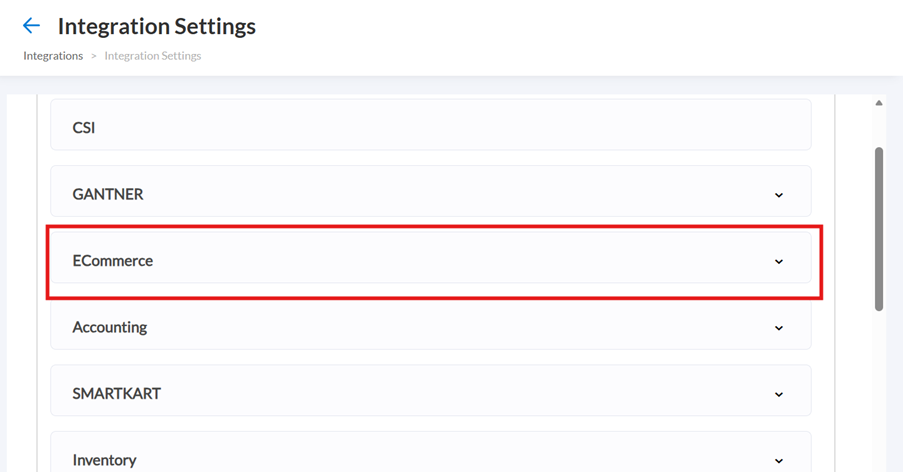
Complete the required sections:
Configuration
Authorize
Manual sync
Locations
Payments mapping
Sync schedule
Shop
Click Save.
All standard Shopify prerequisites apply (Store URL, API keys, SKU matching, payment mapping, and more). Refer to the Shopify integration article for more information.
What syncs to the center
When Shopify is configured at the center level, the following sync to that center:
Customers
Products
Sale orders
Inventory levels
Scheduled sync updates
Invoices generated from Shopify purchases are created in the mapped center.
Notes
One Shopify store can be connected to only one center (either the default center at the organization level or a specific center at the center level). If you try to connect the same store to another center, Zenoti will display a warning. Proceeding will move the store from the previous center to the new one.
If a Shopify store is already configured at the organization level and mapped to a default center, it cannot be configured again at the center level.
Gift card sync remains available only at the organization level.
All existing Shopify integration rules and supported features continue to apply. For example, refunds must be initiated in Shopify, and product variants and exchanges remain unsupported.