Update Billing preferences for Zenoti Integrated Payroll
This article explains how to update billing preferences for the Zenoti Integrated Payroll (ZIP) add-on, including updating the billing bank account, managing billing email recipients, and changing the auto-debit date.
Overview
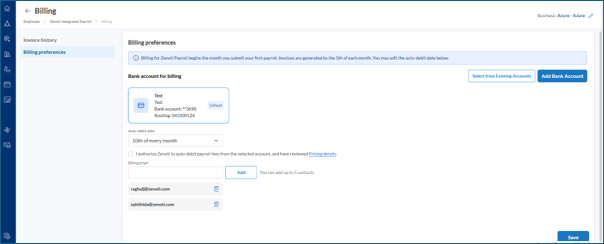
Zenoti Integrated Payroll billing begins the month you submit your first payroll. Invoices are generated by the fifth of each month. The Billing preferences section in the ZIP dashboard allows you to manage the bank account used for payroll fee collection, set or update the auto-debit date, and add email addresses to receive billing notifications. You can add up to five billing email contacts.
Prerequisites
You must have one of the following role permissions assigned to your user profile:
Configure Payroll Payouts or Process Payroll Payouts.
Either of these permissions grants access to the ZIP dashboard and the Billing option in the right-side menu.
Zenoti Integrated Payroll add-on must be enabled for your organization.
Access Billing preferences
To access the Billing preferences section:
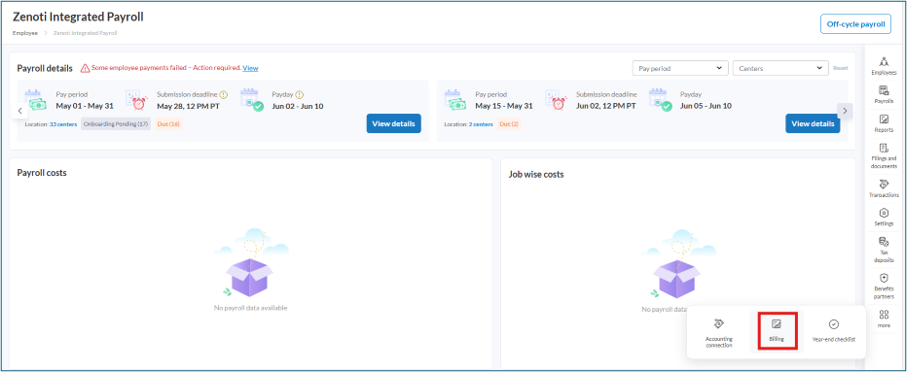
Navigate to Employee > Zenoti Integrated Payroll.
On the ZIP dashboard, click Billing from the right-side menu.
Click Billing preferences from the left panel.
Note
If you manage multiple business locations, use the Business filter at the top-right corner of the Billing page to select the relevant location.
Update the Billing Bank Account
The billing bank account is the account from which Zenoti auto-debits payroll fees. You can select from an existing bank account or add a new one.
Select from Existing Accounts
In the Bank account for billing section, click Select from Existing Accounts.
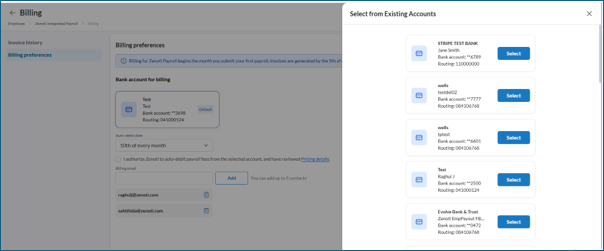
From the slide-out panel, review the list of available bank accounts. Each account displays the bank name, account holder name, masked account number, and routing number.
Click Select next to the account you want to use for billing.
Click Save.
Add a new bank account
You can add a new bank account using instant account verification or by entering bank details manually.
Add using Instant Account Verification
In the Bank account for billing section, click Add Bank Account.
In the Add New Bank Account slide-out panel, enter the email address and full name of the account holder.
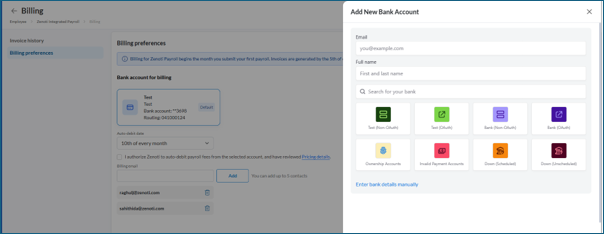
Search for and select your bank from the available options.
Follow the on-screen prompts to verify and add the account.
Add bank details manually
In the Add New Bank Account slide-out panel, click Enter bank details manually.
Enter the following details: Account Number, Routing Number, Account Holder Name, Bank Name, and Account Type.
Click Add Account.
Click Save on the Billing preferences page.
Update the auto-debit date
In the Auto-debit date dropdown, select the preferred date of the month for automatic fee collection.
Select the authorization checkbox to confirm that you authorize Zenoti to auto-debit payroll fees from the selected account.
Click Save.
Add or update Billing email recipients
To add a billing email, enter the email address in the Billing email field and click Add.
To remove a billing email, click the delete icon next to the email address you want to remove.
Click Save.
Frequently asked questions (FAQs)
Q. Can I use a credit card as a payment method for ZIP billing?
A. No. Credit cards are not supported as a payment method for Zenoti Integrated Payroll billing. Only bank accounts can be used for payroll fee collection.
Q. If I update the payroll funding account in Settings, does the billing account update automatically?
A. No. Updating the payroll funding account in Settings does not automatically update the billing account. You must navigate to the Billing preferences section separately and update the billing bank account.
Key terms
Term | Description |
|---|---|
Zenoti Integrated Payroll (ZIP) | Zenoti’s built-in payroll management system that handles payroll processing, tax filings, and related documentation for businesses. |
Billing Preferences | A section within the ZIP dashboard where administrators can configure the billing bank account, auto-debit date, and billing email recipients. |
Auto-Debit Date | The date each month on which Zenoti automatically collects payroll fees from the selected bank account. |
Billing Email | An email address added to receive billing notifications, such as invoice details. You can add up to five billing email contacts. |
Invoice | A billing document generated by the fifth of each month that details the payroll service fees for the preceding billing period. |