
Configure Cloudflare Turnstile for User Verification

This article describes how Turnstile provides a seamless, privacy-first method of confirming that a user is human, eliminating the need for traditional CAPTCHA challenges such as puzzles or image selections.

Overview

Turnstile is a next-generation bot-detection and validation service designed to replace traditional CAPTCHA solutions such as Google reCAPTCHA. Unlike traditional CAPTCHA challenges, Turnstile provides a frictionless, privacy-focused method of verifying that a user is human, without requiring puzzle solving, image selections, or user interaction. 

Developed with modern security and usability in mind, Turnstile offers a seamless experience that protects applications while improving conversion and customer satisfaction. 

Zenoti Webstore enables Turnstile by default for all customers, with the option to continue using reCAPTCHA if preferred.

  • Zero-Interaction User Experience : Traditional CAPTCHA solutions often prompt the user to select images, type distorted text, or perform other puzzle-like actions. Turnstile eliminates this friction. Users are never asked to solve puzzles, and validation happens unobtrusively in the background.

  • Stronger Security : Turnstile uses advanced security signals, including behavioral analysis, machine learning models, and multiple vendor integrations (not limited to one identity provider like Google). This creates a multi-layered, more resilient defense against automated bots.

  • Privacy-First Approach: One of Turnstile’s biggest advantages is its commitment to privacy:

    • Does not track users across websites

    • Does not require interaction with Google or other advertising networks

    • Fully compliant with modern privacy standards

  • Fast and Lightweight: Turnstile is optimized for performance:

    • Minimal JavaScript footprint

    • Low latency 

    • Faster page loading compared to reCAPTCHA

    This helps improve website performance and reduces drop-offs during authentication or checkout flows.

  • Increased Conversion Rates: Reduced friction, especially during login, account creation, and checkout. This means fewer abandoned sessions and higher guest conversion.

How Turnstile Works 

Turnstile provides a small widget embedded on web pages. Unlike reCAPTCHA, the widget mostly works silently. Turnstile evaluates:

  • Browser environment and behavior 

  • Network attributes

  • Non-intrusive challenge-response interactions behind the scenes

Based on this analysis, it classifies the request as human or suspicious and returns a validation token to the backend.

How to enable turnstile

Note

  • Turnstile is currently enabled for all organizations except those using custom domain webstores, as it is not yet compatible in that setup.

  • If a customer configures a custom domain webstore, they must manually turn off Turnstile using the steps provided in this article. They can then enable Google reCAPTCHA, which remains fully supported until Turnstile is launched for custom domains. This ensures their webstore continues to stay secure. Failing to disable Turnstile before setting up a custom domain webstore will prevent users from being able to log in.

  1. At the organization level, click Configuration.

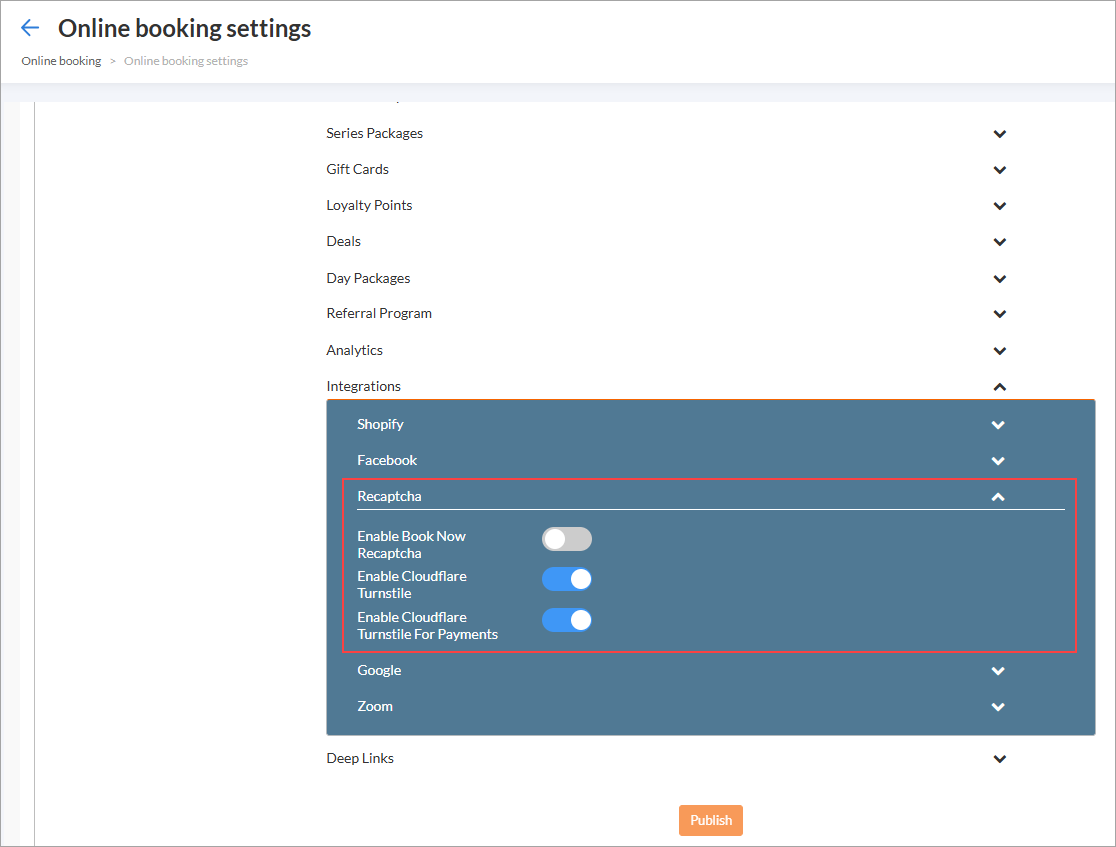
  2. Navigate to Online booking > Online booking settings > Webstore V2.

  3. Click Integrations.

  4. Switch on the Enable Cloudflare Turnstile toggle.

    This ensures guests can complete actions like login or booking without being interrupted by image puzzles. 

  5. Switch on the Enable Cloudflare Turnstile for Payments toggle.

    It helps prevent fraudulent or automated payment attempts while keeping the payment flow smooth and uninterrupted for genuine guests.
    cloudflare.png
  6. Click Publish

Troubleshooting Cloudflare Turnstile Verification

This section helps you diagnose and resolve common issues that may occur during Cloudflare Turnstile verification. In most cases, Turnstile verifies users automatically without any action. When verification cannot be completed automatically, Turnstile may prompt the user with a simple checkbox challenge.

Key terms

  • Turnstile widget: The embedded Cloudflare component that verifies a user

  • api.js: The primary Turnstile JavaScript file that initializes the widget

  • challenges.cloudflare.com: The domain used by Turnstile for secondary challenge/flow requests

  • QUIC: A transport protocol used by modern browsers; relevant when you see QUIC_NETWORK_IDLE_TIMEOUT errors

  • Incognito/Private window: A browser session with extensions disabled by default (unless explicitly allowed)

Prerequisites

Before troubleshooting, ensure:

  • JavaScript is enabled in the user’s browser. 

  • The user can temporarily disable browser extensions or test in an Incognito/Private window. 

  • The user (or their IT team) can allowlist network destinations when required (see actions below).

Limitations

  • If a corporate firewall/VPN blocks Cloudflare challenge traffic, only the user’s IT team can permanently resolve it.

  • Some issues are transient (Example: Brief Turnstile retries). Agents should avoid asking users to refresh immediately; allow a few seconds for Turnstile to selfheal first.

What Success Looks Like

  • Automatic (Most common): The widget verifies the user automatically. It shows “Verifying…” briefly, then “Success!”. No action needed. 

Cloudflare1.png

Manual: If not verified automatically:

The user sees a Verify you are human checkbox. They must click it to proceed.

Cloudflare2.png

After manual verification, the widget displays “Success!” and shows the Cloudflare logo or a QR code inside the widget.

Cloudflare3.png

Failure A: Widget loads but shows error

Symptom: The widget area renders but shows Error 

Cloudflare4.png

Expected behavior: It often self resolves within a few seconds. Do not refresh immediately. You may briefly see a retry screen.

Cloudflare5.png

If it does not resolve and no manual checkbox appears, use the table below:

Likely cause

Why it happens

Resolution

Browser extensions (most likely)

An extension lets the first script load but blocks secondary challenge requests

Ask the user to log in via Incognito/Private window. If it works there, disable all extensions in the normal window and retry.

Network/Firewall block

Firewall allows api.js (or it is cached) but blocks secondary challenge/flow traffic

Ask the user to have IT allowlist challenges.cloudflare.com for all protocols (TCP and UDP). Then retry.

Corrupted browser cache

A broken cached script prevents proper initialization

Instruct the user to hard refresh (Ctrl+Shift+R). If still failing, clear cache and retry.

Agent checklist

  • Wait a few seconds for auto recovery. Avoid immediate refresh. 

  • Test in Incognito/Private window. 

  • If Incognito works, disable extensions and retry. 

  • If still failing, involve IT to allowlist challenges.cloudflare.com (TCP/UDP).

  • As a last step, hard refresh → clear cache.

Failure B: Widget does not load

Symptom: The widget area is blank or reserved space only.

Cloudflare6.png

How to diagnose

  1. Press F12 to open Developer Tools.

  2. Check Console for errors like: net::ERR_QUIC_PROTOCOL_ERROR.QUIC_NETWORK_IDLE_TIMEOUT, net::ERR_CONNECTION_TIMED_OUT, net::ERR_CONNECTION_RESET, net::ERR_NAME_NOT_RESOLVED.

    Cloudflare7.png
  3. Check Network tab for api.js request failures.

    Cloudflare8.png

Causes and fixes

Likely causes

Why it happens

Resolution

Corporate Firewall / VPN block (most likely)

Network security tools block Turnstile subrequests, common with QUIC timeouts

Ask IT to allowlist the entire challenges.cloudflare.com domain so all subrequests are permitted.

Browser extensions

Ad/script/privacy blockers prevent the widget from loading

Test in Incognito/Private window