Manage Aveda Certificates
This article explains how to redeem Aveda salon-spa certificates for eligible services at Zenoti checkout and how to issue and redeem the Aveda Birthday Gift Certificate.
Overview
Zenoti supports redemption of Aveda salon-spa certificates against eligible services and allows issuing a Birthday Gift Certificate for Aveda Plus members from the guest profile.
Key terms
Salon-Spa Certificate: A one-time use Aveda certificate with a fixed dollar value (e.g., $50, $75) applicable to eligible services
Birthday Gift Certificate: A special certificate issued to Aveda Plus members that can be redeemed even without an Aveda product in the invoice
Prerequisites
Aveda Plus Rewards integration is enabled.
At the organization level, the Enable All Services for Aveda Certificate Redemption toggle is on (optional but recommended).
Eligible services have the This is an Aveda service flag enabled.
Limitations and considerations
Only one certificate per service quantity.
Certificates are one-time use; transactions cannot be reversed once redeemed.
Certificates must be redeemed on a transaction that includes at least one Aveda product (The amount should be more than 0). These cannot be applied to $0 invoices. Exception: Birthday Certificate can be redeemed without a product.
Salon-spa certificates are valid only for services, not products. No transaction amount is passed when redeeming these certificates.
Dual Redemption Scenario: If both an eligible Aveda product and service are on the same invoice, the certificate applies to the service, and points accrue on the product.
Partial service redemptions are permitted when certificate value is less than service price; balance is paid via other methods. Only one certificate per service.
Redeeming a Salon-Spa Certificate at POS
Add eligible Aveda services (and at least one Aveda product, unless using a Birthday Certificate).
Select the certificate the guest wants to redeem.
Click Redeem.
Click Apply to complete.
The redemption will be recorded as a custom transaction. The certificate will be marked as redeemed automatically after the transaction is complete and will appear in the Certificate redemption status.
Issuing a Birthday Gift Certificate
You can issue the Birthday Free Gift to an Aveda Plus member during their birthday month from either the guest profile or from POS. Both paths add the reward to the same Aveda Plus Rewards account; staff uses whichever path is convenient at the time of the guest's visit.
Issue from the guest profile
Use this path when you are not at POS — for example, when the guest calls ahead, drops in without buying anything, or you are setting up the reward in advance.
Go to Guests > Manage Guests and open the guest profile.
Go to the Points tab.
Click Collect Aveda Birthday Reward.
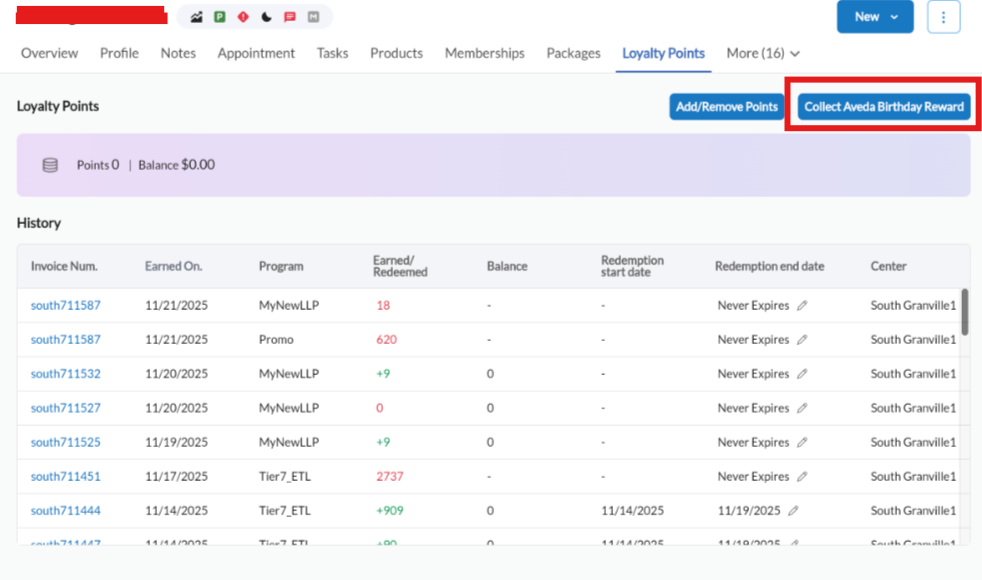
Hand the gift to the guest.
After the birthday certificate has been issued, this button will be disabled. Staff must reduce inventory of that product manually to avoid errors.
Issue from POS
Use this path when the guest is already at checkout, especially if you plan to redeem the gift in the same visit.
At the point of sale, open the guest's invoice.
In the payments panel, click Points.
Click Redeem. The Aveda Plus Rewards modal opens.
Click Collect bonus points.
After the Birthday Free Gift has been issued, it appears in the Select bonus certificates dropdown and can be redeemed in the same flow.
Redeeming a Birthday Free Gift
The Birthday Free Gift is selected from the bonus-certificates list inside the Aveda Plus Rewards panel at POS. Aveda does not provide Zenoti with a list of products that are eligible for the Birthday Free Gift, so front-desk staff selects the eligible product, adds it to the invoice, and removes it from inventory by applying a 100% discount with a mandatory comment.
Note
Confirm the eligible product against Aveda's published guidelines before adding it to the invoice. Birthday Offer Certificate and Birthday Free Gift are separate certificates in the Aveda Plus Rewards panel — make sure you select the correct one.
Steps:
At the point of sale, open the guest's invoice.
Add the eligible Aveda product to the invoice as a line item.
In the payments panel, click Points. The Aveda Plus Rewards summary appears, showing Available points, Aveda products in cart, and Aveda services in cart.
Click Redeem. The Aveda Plus Rewards modal opens.
Click the Select bonus certificates dropdown.
In the list, check Birthday Free Gift. (Do not check certificates the guest is not redeeming.)
Click Apply.
On the invoice, locate the eligible Aveda product line and enter a discount equal to the product's price (a 100% discount).
Hand the eligible Aveda product to the guest.
Complete payment for any remaining items on the invoice as usual.
Tip
Instead of applying a 100% discount in step 8, you can add the product to the invoice and set its sale price to 0. Either approach leaves the product on the invoice at no cost to the guest. Inventory still needs to be reduced manually regardless of which method you use.