Configure lead sources
Lead source is the channel or method through which a potential customer discovers and engages with your business. It helps you track where your leads come from so you can measure marketing effectiveness, optimize campaigns, and allocate resources wisely.
By assigning a lead source to each new inquiry or customer, your business can identify which channels drive the most conversions and revenue.
For example, your lead sources may include Client referrals, Instagram, Facebook, TikTok, Google Ads, Email and SMS campaigns, and Marketing phone calls.
Lead sources matter because they provide clear visibility into where customers are coming from, enabling businesses to track ROI (Return on Investment), allocate marketing spend more effectively, and gain deeper insights into customer behavior. By knowing which channels perform best, businesses can focus on the most impactful campaigns while also streamlining the sales process to nurture leads more efficiently based on their origin.
At the organizational level, navigate to Lead Management > Lead Settings > Lead Sources.
The page displays all your lead sources.
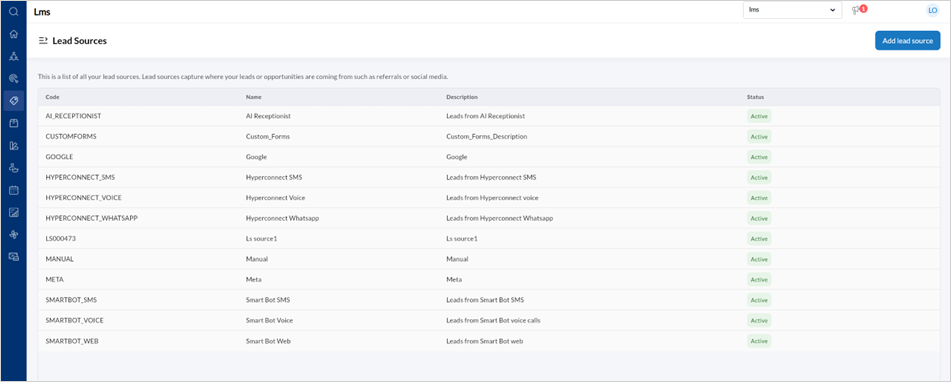
To add a new Lead source, click Add lead source.
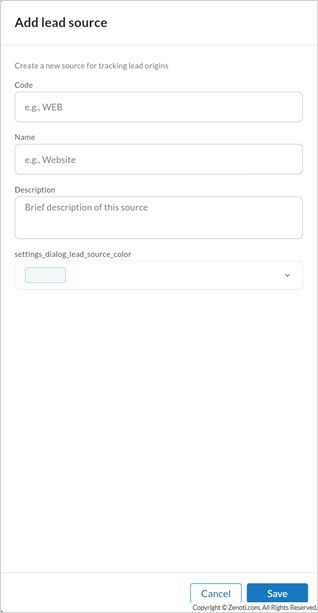
Enter the Code, Name of the lead source, a Description of the sources, and Color.
Click Save.
To edit a Lead source,
Hover over the specific Lead source listing and click the edit icon.
Edit the Code, Name, Description, or Color.
Set the lead source as active or inactive by using the toggle.
Click Save.