Configure call outcomes
A call outcome is a status used to capture the result of a call made to a lead or customer. It helps your team consistently record what happened during the call, whether it was successful, required follow-up, or did not connect at all.
By tracking call outcomes, businesses can measure call effectiveness, standardize lead engagement, schedule automated follow-ups, and gain insights into sales and service performance.
For example, your call outcomes may include Booked appointment, Interested - Follow-up needed, Interested - Wants discount, No answer, and Not interested.
At the organizational level, navigate to Lead Management > Lead Settings > Call Outcomes.
The page displays all your call outcomes.
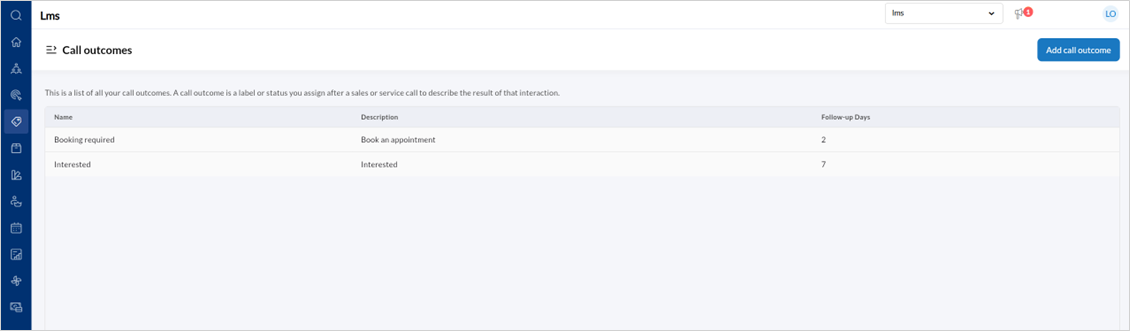
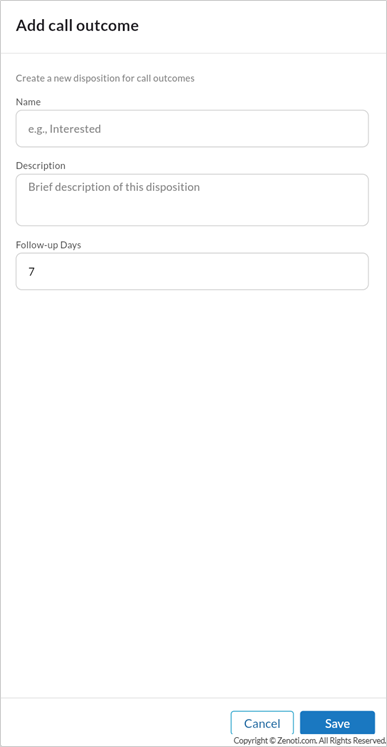
To create a call outcome, click Add call outcome.
Enter the Name, Description, and Follow-up days.
Click Save.
To edit a Call outcome,
Hover over the specific Call outcome listing and click the edit icon.
Edit the Name, Description, or Follow-up days.
Click Save.