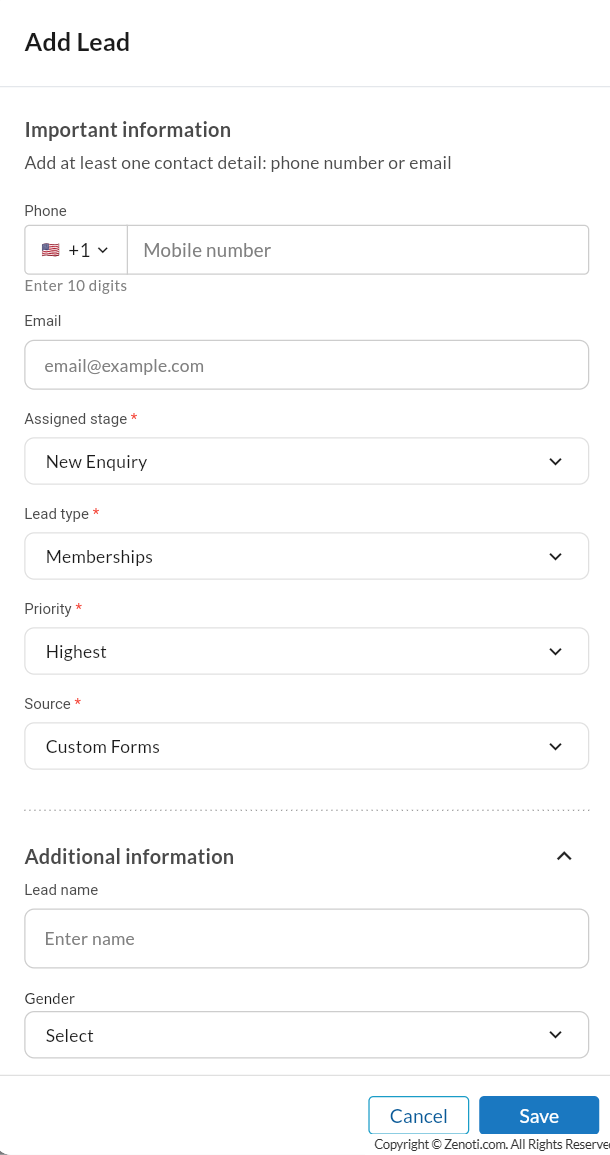
Add a new lead (Manual lead creation)
The Add Lead option is used when a team member wants to manually create a lead in the system. This is typically done when enquiries are received through channels that are not automatically integrated with the system, such as phone calls, walk-ins, or direct conversations.
While leads can be created automatically through forms, integrations, or workflows, the Add Lead option allows employees to manually record enquiries so they can be tracked and followed up.
To manually add a lead,
Navigate to Lead Management > All leads at the organization level.
Click Add Lead.
Select the Assigned stage, Lead type, Priority, and Source.
In Additional information, enter:
Lead name
Gender
Description
Center
Create date
Owner
List price
Offered price
Follow-up date
Expected close date
Click Save to create the lead.